
The Performance tab in ezManage gives you a clear view of how your locations are performing on the ezCater marketplace, not just how much you’re selling.
You can use this dashboard to:
-
Track sales, orders, and menu views over time
-
Understand how customers are finding your marketplace listing
-
Compare performance to the same time period last year
-
Download your data for deeper analysis in your own tools
Watch our video to learn more:
How to Find
-
Sign in to your ezManage account.
-
Click the Performance tab from the left-hand navigation.
- Select the locations you want to review.
What You can See
The Performance dashboard focuses on your marketplace funnel and sales over time.
You’ll see:
-
Sales and order volume
-
Track how much you’re selling and how many orders you’re fulfilling in the time period you’ve selected.
-
-
Menu views
-
See how many customers are viewing your menu on our marketplace.
-
-
Year-over-year comparisons
-
For supported date ranges, you can compare this year’s performance to the same period last year to see how you’re trending.
-
-
Orders over time
-
A visual chart helps you spot trends (for example, day-of-week or seasonal patterns).
-
Data in the Performance tab is updated daily, so you’re always working with recent information.
Using Date Ranges and Filters
At the top of the dashboard, you can:
-
Select a date range
-
Choose presets like month-to-date, year-to-date, or set a custom date range to match your reporting needs.
-
-
View year-over-year data (when available)
-
When you choose an eligible date range, the dashboard can show the same dates from the previous year for comparison.
-
-
Download a CSV report
-
Use the Download option to export your data as a CSV file you can open in Excel or your own reporting tools.
-
Sponsored Listings and Ads Reporting
If your locations are in markets with Sponsored Listings, you’ll see additional detail about where your orders are coming from.
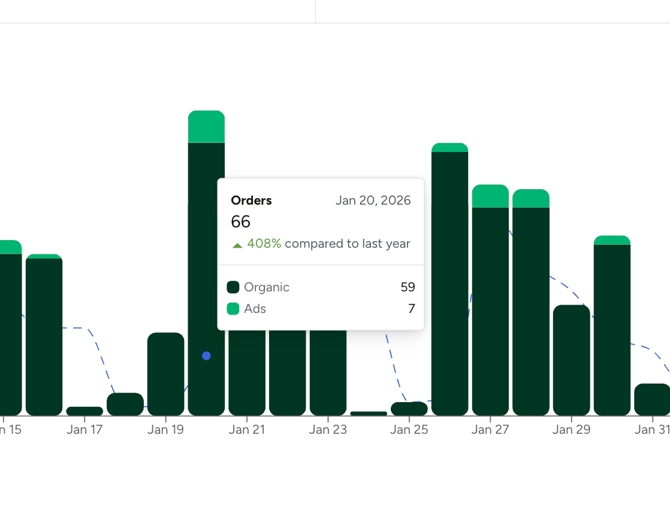
The dark green shows orders placed from organic search, and the light green for orders placed from your sponsored listings. This helps you understand where your orders are coming from on the marketplace and how ads are contributing to your overall performance.
Preferred Partner Program Markets
In markets that do not yet have Sponsored Listings you’ll see your organic marketplace sales and orders only in this dashboard.
Reverting to the Previous Performance Page (temporary)
For now, you may see a link at the top of the new Performance dashboard that says “Revert to previous performance page.”
-
Click this link if you prefer to temporarily use the older Performance view.
-
This option will only be available for a limited time as we transition all partners to the new experience.
Why we made this change
Partners have asked for more robust reporting that goes beyond sales totals. The redesigned Performance tab:
-
Brings your funnel metrics (views, orders, sales) into one place
-
Helps you see how customers are finding and engaging with your listings
-
Supports current and future marketing programs like Sponsored Listings
-
Gives you data you can use to optimize your listings and grow orders on ezCater
Over time, we’ll continue to add more metrics and features so you can make even more informed decisions about how to market your stores on ezCater.
If you have questions please don't hesitate to email us at partnersuccess@ezcater.com