
You now have the ability to have ezDispatch drivers automatically assigned on orders that fall within specific parameters. You can configure these settings by navigating to the ezDispatch section under the Delivery tab in ezManage. Here you can choose to have our third-party delivery partners automatically assigned to orders based on Lead time, Time of day, Order size and Delivery distance.
Lead Time Configuration
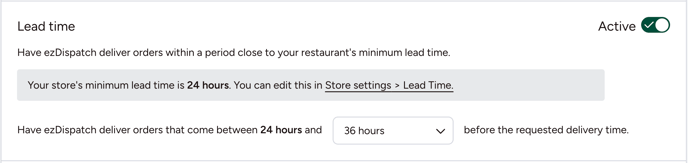
Your lead time is the minimum advanced notice you need for new orders. Choose a configuration to have ezDispatch requested for any orders too close to your lead time. For example, in the screenshot below the restaurant's lead time is 24 hours. By choosing a configuration of 36 hours, all orders placed by customers between 24 and 36 hours will automatically be assigned to ezDispatch for delivery.
Pro tip: configuring ezDispatch based on lead time allows you to lower your overall lead time which can help you to receive more orders!
Time of Day Configuration
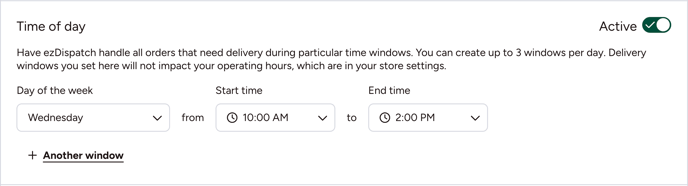
Here you can choose any days/times where you know you are unable to deliver yourself. Choose a day of week from the drop down menu and set a window where ezDispatch will handle deliveries. In the example below, any orders with a delivery time of Wednesday between 10 AM and 2 PM will be assigned to ezDispatch.
Pro tip: create up to 3 windows for each day if there are multiple time frames when you cannot deliver!
Order Size Configuration
Choose to have orders over a certain amount, or under a certain amount automatically assigned to ezDispatch. Choose Greater than or Less than in the drop-down menu and then choose your threshold. In the example shown below, any orders that have a subtotal of over $800 will automatically request an ezDispatch driver.
Reminder: Subtotal is the order value before delivery fee, tax, tip and ezCater fees.

Delivery Distance
Want to limit how far your drivers need to travel from your restaurant? Instead of reducing your delivery distance, have ezDispatch handle all deliveries past a certain number of miles. As shown below, select a number of miles from the drop-down menu. In this example, any orders over 10 miles from the restaurant will automatically be delivered by ezDispatch.
Reminder: the maximum delivery distance for ezDispatch is 20 miles in most metros.

Important Notes:
- Configure multiple settings to be sure you are only receiving orders you can accept - no need to choose one configuration!
- These settings can only be configured for restaurant partners that are set up for self-delivery. Partners using automatic ezDispatch have no need to configure these settings.
-
Reach out to our delivery team if you have any questions about ezDispatch coverage in your area.
- If you would like to signup to have ezDispatch deliver all of your orders, fill out the form here.